
1 Introduction.
The .CO Registry system is based on the CentralNic Shared Registry. Most Registrars will be familiar with the operation of the CentralNic SRS and as such should not encounter any issues when connecting to the .CO Registry.
Please note that the .CO Registry is being operated on a fully independent instance of the CentralNic shared Registry system, which is both physically and logically separate from the CentralNic’s centrally managed SRS.
2 Purpose of this Document.
This document has been written to provide new and existing Registrars with all the information they need to successfully integrate with the .CO Registry, which is operated operated by CentralNic. It covers technical, financial and policy considerations involved in the integration process. All Registrars are strongly advised to read this document thoroughly. If you have any questions regarding this document, please get in touch and we will be very happy to assist you.
- E-mail: support@registry.co
3 Accreditation.
To be granted access to the .CO Registry System, all Registrars must sign the .CO RRA Agreement. You are not required to deposit funds before signing the Agreement or before completing OTE testing. To request accreditation for the .CO Registry please email support@registry.co.
4 Interfaces.
Registrars can interact with the .CO Registry System using the following interfaces:
- Registrar Console
- EPP Server
- FTP Server
4.1 Registrar Console.
The Registrar Console provides a simple way to manage objects in the Registry using a web interface. Access to the Registrar Console is via secure web application at
https://registrar-console.registry.co/
This console allows Registrars to manage domain names and transfers and change account settings.
4.1.1 Access Control.
Each Registrar may have any number of user accounts associated with it. Registrars should create a separate user account for each employee who accesses the Registrar Console. User accounts may be assigned to one of four roles:
- Administrator: Each Registrar account has only one Administrator, has full access to all features, and may create, update and delete other user accounts (including Managers).
- Manager: The user has full access to all features, and may create, update and delete other user accounts (excluding Managers and Administrators).
- Domain Administrator: The user has limited access and can only access domain, contact and host management features.
- Finance Administrator: The user has limited access and can only access billing, payment and account management features.
Two-Factor Authentication (2FA) is supported using any authenticator app that implements Time-Based One-Time Password (TOTP), such as Google Authenticator. Registrars are encouraged to use Two-Factor Authentication on all user accounts. Administrator and Manager accounts may enforce use of 2FA by all user accounts through the Account Settings page.
4.2 EPP Server.
The EPP server is documented fully in Section EPP System.
4.2.1 Access Control.
While access to the Registrar Console is not restricted, connections to the EPP server and for FTP access are restricted by IP address. Registrars must provide a list of IP addresses (or networks) from which they will make connections. This list can be managed online via the Registrar Console.
4.3 FTP Server.
An FTP server is provided to allow Registrars to download reports and data. A list of the available files is provided in Section 5.3.2.
4.3.1 Access Control.
Access to the FTP server must be enabled on your account. Access will also be restricted to hosts that are registered on your IP Access List, which may be updated via the Registrar Console. To ensure the confidentiality and integrity of the data provided by the FTP server, all connections must be secured by TLS (SSL). Registrars must therefore use an FTP client that supports FTPS, such as FileZilla, cURL, wget or lftp. To connect to the FTP server, use your Registrar ID and FTP password (which can be obtained from the “Passwords” page of the Registrar Console) and connect to ftp-registrar.registry.co on TCP port 21. Registrars can also access the files on the FTP server through the “FTP File Browser” on the Registrar Console. (https://registrar-console.registry.co/).
4.3.2 Available Files.
Domain Drop List
Every twenty-four (24) hours we generate a separate file for each domain extension listing all the domains that have the pendingDelete status. The file is a CSV file with the following fields:
| Column | Description |
|---|---|
| Domain_Name | The domain name. |
| Date_Entered | The date and time the domain entered the RGP. |
| Date_Leaves | The date and time the domain will leave the RGP. |
| Date_Purged | The approximate date and time that the domain will be purged from the database. |
These files are stored in the “droplist” directory of the FTP server.
Note: Not all domains in the “droplist” are guaranteed to be released to the available registration pool. The .CO Registry may reserve, block or otherwise make any domain unavailable at Registry´s discretion.
List of Unavailable Domain Names
We provide a complete list of all “unavailable” domain names. This list includes:
- Registered names
- Banned names
- Blocked names
- Reserved names
A file is generated every two (2) hours. The file is a Gzip-compressed plain-text file with Unix line endings. These files are stored in the “lordn” directory of the FTP server.
Pricing Information
All prices for .CO domains are stated and managed in USD in the .CO Registry system. Some domains may have a non-standard price. We provide a CSV containing the following fields:
| Column | Description |
|---|---|
| domain | The domain name |
| type | Transaction type, including Registration, Renewal, or Restore |
| amount_usd | Price in USD |
Note: There may be multiple rows for the same domain representing different transactions, for example:
domain,type,amount_eur,amount_gbp,amount_usd
example.co,Registration,100.00,100.00,40.00
example.co,Renewal,100.00,100.00,40.00
example2.co,Registration,250.00,250.00,40.00
These files are stored in the “prices” directory of the FTP server.
Billable Transactions
Billable transactions are transactions that have passed the grace period and will therefore make it onto an invoice. Registrars can download CSV files that detail all billable transactions for their account for the following periods:
- Daily
- Weekly
- Monthly
Files are in CSV format with the following columns:
| Column | Description |
|---|---|
| Timestamp | Date and time of the transaction |
| Domain | The domain name |
| Type | Transaction type. One of: Registration, Renewal, Auto-Renewal |
| Grace Period | Grace period for the transaction in days |
| Currency | Currency for the transaction |
| Amount | Amount of the transaction in the above currency |
Files are stored in the “transactions” directory of the FTP server. There are three subdirectories:
- “transactions/daily/” contains daily transaction reports. Filenames have the form “YYYY-MM-DD.csv”
- “transactions/weekly/” contains weekly transaction reports. Filenames have the form “YYYY-NN.csv”, where “NN” is the week number.
- “transactions/monthly/” contains monthly transaction reports. Filenames have the form “YYYY-MM.csv”
Files will not be present if no billable transactions have occurred during the period in question.
Automated FTP Access
The lftp program1 can be used to automate the downloading of files from the FTP server. The following lftp script provides an example:
set xfer:clobber true
set ftp:ssl-auth TLS
set ftp:ssl-force true
set ftp:ssl-protect-list yes
set ftp:ssl-protect-data yes
connect ftp-registrar.registry.co
login REGISTRAR-ID FTP-PASSWORD (replace as applicable)
get prices/design.csv
quit
1 Available from http://lftp.yar.ru
5 Technical Support.
Support requests are to be sent to support@registry.co. This allows us to monitor and track support requests and provides an escalation path for urgent issues with the .CO Registry system.
In the unlikely event that the support@registry.co email is unresponsive, Registrars may also contact the CentralNic support channels:
- Telephone: +44 (0)20 33 88 0600 (24/7)
- E-mail: support@centralnic.com
5.1 Maintenance Downtime.
CentralNic may, on occasion, need to take down portions of the .CO Registry system for maintenance. This will never affect the resolution of domains already registered. Registrars will receive notification via email well in advance of any planned outage (Registrars must specify an “Operations” email address for their account to receive these notifications). Additionally, we will notify Registrars at the beginning and end of any planned maintenance window, so that Registrars are aware when planned maintenance has been completed. Registrars will also be notified of any unscheduled outages.
6 Billing.
By default, .CO accounts are set to the Debit Model.
6.1 Available Billing Models.
6.1.1 Debit Model (Prepayment).
This model is the same as that operated by most gTLD and ccTLD registries. Registrars maintain a balance of funds with the Registry, from which registration and renewal fees are deducted. Payment must be remitted to the Registry by bank transfer. Under this model, our system will automatically send an email to your specified billing address if your balance is running low.
6.2 Renewals.
The .CO Registry operates two models for domain name renewals.
- Auto-Renew. All domain names are automatically renewed. The “Auto-Renew Grace Period” applies to these renewals (see Section Renewal).
- Auto-delete. All domains that are not explicitly renewed by the Registrar are automatically placed on "Pending Deletion" when they expire. These domains may be restored using the RGP Restore command (see Section Redemption Grace Period).
By default, all accounts for .CO are set to the Auto-Renew model.
6.3 Invoicing.
The .CO Registry system will generate an informative invoice for registrations and renewals. We will generate a new invoice on the last day of each month for all registrations and renewals that have taken place and have completed their respective grace periods since the previous invoice.
6.4 Submitting Payment.
You are requested to notify us of payment through our support email support@registry.co. This will ensure your payment is allocated correctly when it reaches us. Payment is made by bank transfer.
Details for payment are:
| Banking information | CentralNic Limited Account details Wire transfers are payable through Bank address: HSBC Bank USA, N.A., 66 Hudson Blvd., New York, NY 10001 ACH transfers are payable through |
|---|
The .CO Registry does not accept payments via Credit Card. All payments must be submitted via Bank Transfer.
6.5 Premium Domain Name Pricing.
Premium .CO domains are provisioned and managed using the same SRS interfaces, and billed to Registrars in the same way, as regular domains. If a domain name has a higher fee associated with it, then Registrars must obtain this fee and include it in any EPP commands to provision and manage this name: this ensures that these domains cannot be accidentally registered or renewed without the premium cost being known to the Registrar.
CentralNic provides two interfaces through which premium pricing can be obtained:
- FTP interface (see Section FTP Server).
- EPP fee extension (see Section Fee Extension).
6.6 Promotional Pricing.
Registrars may be offered promotional pricing. If a billable transaction is subject to a promotional discount, then this discount will be applied at the moment of the transaction, rather than afterwards. Registrars may need to calculate the discounted fee when submitting fee information via EPP for certain promotions. Registrars will be informed if a specific promotion requires the submission of the fee.
6.7 Preparing your Account for Operations.
To avoid problems, Registrars must ensure that their account has sufficient credit available to cover their normal transaction volumes.
6.8 Account Balance/Credit Limit Automated Interface.
A Registrar account’s account balance and/or credit limit may be programmatically
retrieved by submitting an HTTP GET request to the following URL:
https://registrar-console.registry.co/json/balance
This URL is protected by HTTP authentication: use your Registrar ID and EPP password to access it. The response is a JSON object of the following form:
{
"availableCredit" : "960398.50",
"balance"   : "-39601.50",
"creditLimit"      : "0.00",
"creditThreshold" : "200000.00"
}
The properties of the object have the following meanings:
- AvailableCredit: The amount of credit, including any credit (emergency or otherwise), still available to fund registrations, renewals, and transfers.
- Balance: The balance available on your account. If this value is negative, any prepayment balance has been exhausted.
- CreditLimit: What your credit limit is. This value may be affected by Emergency Credit in case of unexpected exhaustion of funds.
- CreditThreshold: The threshold at which we will notify you (by email) that you may wish to deposit additional funds.
All values are in USD.
6.9 Account Settings.
Registrars can query for their current account settings by submitting an HTTP GET request to the following URL:
https://registrar-console.registry.co/json/settings
This URL is protected by HTTP authentication: use your Registrar ID and EPP password to access it.
The response is a JSON object of the following form:
{
"org": {
"Registrar-id": "H12345", "name": "Example, Inc", "trading-name": null, "iana-id": 9999,
"website": {
"rel": "website",
"href": "http://www.example.co/"
},
"port43": null, "voice": {
"rel": "voice",
"href": "tel://+44.123456789"
},
"fax": null
},
"int": {
"street": [
"123 Example Street",
"Suite 4"
],
"city": "Exampletown", "sp": "Exampleshire", "pc": "EX12 3AM",
"cc": "GB"
}
},
"notificiations": {
"primary": "info@example.co", "billing": "domain.billing@example.co",
"transfers": "domain.transfers@example.co", "operator": "domain.operations@example.co",
"abuse": "domain.security@example.co", "legal": "domain.legal@example.co"
},
"billing": {
"Auto-Renew-enabled": true, "billing-model": "pre-payment", "billing-interval":
"monthly", "billing-currency": "USD", "invoice-per-currency": false, "balance": {
"rel": "balance",
"href": "https://registrar- console.registry.co/json/balance"
} }, "epp": { "message-queue-enabled": true, "password-last-updated": "2017-03-01T14:06:53.0Z", "check-options": { "premiums-are-unavailable": false, "claims-are-unavailable": false, "idns-are-unavailable": false } }, "transfers": { "email-notifications": false }, "data-protection": { "contact-purge-enabled": true } }
7 Registry Operations.
7.1 DNS.
CentralNic operates a network of DNS servers at many locations around the world. We are proud to be able to claim 100% availability of DNS services since we began operating in 1995.
7.1.1 DNSSEC.
All zones for the .CO Registry are signed using DNSSEC. The zone’s authenticity is established via a DS Record in the Root Zone, utilizing Algorithm 8 (RSA/SHA-256) to validate the TLD's Key Signing Key (KSK).
Key Management: The Registry employs a Split-Key architecture, separating the KSK (Key Signing Key) and ZSK (Zone Signing Key). Both keys are published within the visible DNSKEY Resource Record set.
Denial of Existence: To prevent zone enumeration and optimize zone size, the Registry utilizes NSEC3 records with the Opt-Out flag enabled. This configuration provides hashed denial-of-existence proofs for authenticated non-existence responses.
7.1.2 WHOIS Service.
WHOIS is described by RFC 3912. The .CO Registry operates a standard WHOIS server that you can use to check the details of any domain name registered with the .CO Registry. You can use any standard WHOIS client (including the UNIX terminal client) to query our WHOIS server at whois.registry.co.
Note: Use of the WHOIS service is subject to strict usage limits, to prevent unauthorised access to personal information about registrants.
7.2 Supported Query Types.
7.2.1 Domain Query.
By default, any query is assumed to be a domain name unless a keyword is prepended to the query. If the domain exists, then a record is returned which includes the following fields:
- Domain Name
- Internationalized Domain Name (if any)
- Registry Domain ID
- Registrar WHOIS Server
- Registrar URL
- Updated Date
- Creation Date
- Registry Expiry Date
- Registrar
- Registrar IANA ID
- Domain Status (multiple)
- Name Servers (if any, multiple)
- DNSSEC status
- Registrar Abuse Contact Email
The Domain ROID is the Repository Object Identifier as described in RFC 5730, §2.8. The ROID field corresponds to the <domain:roid> element of EPP <info> responses.
A domain may be associated with one or more status codes. These are represented using standard EPP mnemonic codes. A domain may have any of the following status codes:
- addPeriod – the domain is in the Add Grace Period.
- clientHold – the Registrar has temporarily removed the domain from the DNS.
- clientDeleteProhibited – deletion of the domain is not permitted unless the sponsoring Registrar removes this status code.
- serverDeleteProhibited – deletion of this domain has been forbidden by the Registry.
- inactive – the domain has no DNS servers.
- pendingDelete – the domain has left the Redemption Grace Period and is scheduled for deletion.
- redemptionPeriod – the domain is in the Redemption Grace Period.
- pendingTransfer – there is an active inter-Registrar transfer for the domain.
- renewPeriod – the domain is either in the Renew Grace Period or the Auto-Renew Grace Period.
- clientRenewProhibited - renewal of the domain is not permitted unless the sponsoring Registrar removes this status code.
- serverRenewProhibited – renewal of the domain has been forbidden by the Registry.
- serverHold – the Registry has temporarily removed the domain from the DNS.
- transferPeriod – the domain is in the Transfer Grace Period.
- clientTransferProhibited – transfer requests for the domain will be rejected unless the sponsoring Registrar removes this status code.
- serverTransferProhibited – transfer requests for the domain will be rejected by the Registry.
- clientUpdateProhibited – updates to the domain are not permitted unless the sponsoring Registrar removes this status code.
- serverUpdateProhibited – updates to the domain have been forbidden by the Registry.
- ok – present if none of the above applies.
Domains may have 0-13 DNS servers. If a domain name has no DNS servers, then the "inactive" status code appears in the Status section. If the registrant provided DS records for their DNSSEC-signed domain, then the “DNSSEC” field will contain the string “signedDelegation”, otherwise it will contain the string “unsignedDelegation”.
7.2.2 Host Query.
Users can query for information about a host object by submitting a query of the form "nameserver [HOST]". The following information is included in host records:
- Server Name
- IPv4 address(es) (if any)
- IPv6 address(es) (if any)
- EPP status codes
- Sponsoring Registrar
- Creation Date
- Referral URL (if any)
A host object may have one or more IPv4 or IPv6 addresses if the host is "in-bailiwick", i.e. subordinate to a domain name within a zone operated by the Registry. IP address information is not shown for "out-of-bailiwick" hosts.
Host objects may only have two status codes:
- INACTIVE – the host is not associated with any domain names.
- LINKED – the host is associated with one or more domain names.
The Referral URL is the website of the Sponsoring Registrar for this host. If the host is subordinate to a domain name in the TLD, this will be the Sponsoring Registrar of the parent’s name. If the host is out-of-bailiwick, then the Sponsoring Registrar is the Registrar who issued the original <create> request.
Query by IP Address
If an IPv4 or IPv6 address is provided instead of a fully qualified domain name, then the server will look for host objects that have this address. If there are multiple host objects that match the address, the server will return a list of all the matching host objects.
Registrar Query
Users can query for information about a Registrar by submitting a query of the form "Registrar [REGISTRAR]", where "[REGISTRAR]" is either the Registrar’s unique ID (e.g. H12345) or the full Organization Name of the Registrar.
The following information is included in Registrar records:
- Registrar ID
- Registrar Name
- Postal Address (as a single field)
- Telephone Number
- Email Address
- Website URL
- Administrative Contact
- IANA ID (if ICANN accredited)
- Last Updated Date
7.3 Character Encoding.
Responses are encoded as UTF-8. The server assumes that all queries are encoded in UTF-8.
7.4 IDN Support.
The WHOIS service supports Internationalized Domain Names. Users may submit queries for IDN domains using either the (UTF-8 encoded) U-label or the A-label.
7.5 Rate Limiting and Access Control.
The WHOIS protocol provides information in a human-readable format. It was not designed for consumption by automated systems but serves to provide information regarding domain name registrations.
Use of the WHOIS service for performing domain name availability checks is not recommended. The .CO Registry does not guarantee, and Registrars should not assume, the accuracy or timeliness of the data produced by the WHOIS system. Furthermore, CentralNic may change the layout or content of WHOIS records at any time, which may break automated parsers of WHOIS responses.
Registrars wishing to do high volume domain name availability checks are advised to use EPP, which offers significant benefits over the WHOIS service. The EPP system also provides additional methods for obtaining information about domain name registrations, in a format that is strictly defined and easy to parse.
8 The Shared Registry System.
The .CO Registry provides an object-oriented Registry system, in which Registrars manage domain, contact, and host objects. Each object is associated with a single Registrar, who is said to be the “sponsor” of that object. Objects may be created, updated, deleted and transferred between Registrars.
8.1 Domain Objects.
8.1.1 Registration.
In order to be successfully registered in the system, a domain name MUST:
- have a prefix (the label to the left of the TLD) of between one and sixty-three characters,
- only contain characters from the set A-Z, 0-9 and “.” and “-” (case insensitive).
Domain names should also:
- have a Registrant Contact,
- have an Administrative Contact,
- have a Technical Contact,
- have a Billing Contact,
- have 0-13 DNS servers,
- have zero or more DS records.
DNS delegation information is not required for a successful registration.
- .CO Domain names may be registered for a period between 1 and 5 years.
- Registration is openly available for Registrars under the .CO extension level for 2nd level domains and under the .COM.CO, .NET.CO, .NOM.CO levels for 3rd level domains.
- Additional extensions .ORG.CO, .EDU.CO, .MIL.CO and .GOV.CO are only available manually through Registry-supported website https://www.registrocolombia.co/. Note that these extensions may be restricted to specific qualified registrants and are not openly available.
8.1.2 Renewal.
Registrars may renew domain names for any whole period of years, not exceeding 5 years into the future.
8.1.3 Transfer.
Domain names may be transferred between Registrars. The procedure for domain name transfers is as follows:
- The registrant acquires the authInfo code for the domain name from the losing Registrar, and, depending on the status of the domain, requests that the “clientTransferProhibited” status be removed from it.
- The registrant supplies the authInfo code to the gaining Registrar.
- The gaining Registrar submits a transfer request to the Registry, using the authInfo code received from the registrant.
- The Registry notifies the losing Registrar of the transfer request. The losing Registrar has five calendar days to explicitly approve or reject the transfer, after which the transfer is automatically approved.
- Once the transfer is approved, the Registry notifies the gaining Registrar, and the domain name is transferred within 60 seconds.
There is a minimum renewal period of one (1) year for all inter-Registrar transfers. Notifications are sent to both the gaining and losing Registrar via email and the EPP message queue (see Section Message Queue). Registrars do not need to process an additional Renew command as this is automatically executed by the system upon a domain transfer.
Registrars are required to provide the authInfo code for domain names to registrants upon request.
When a domain transfer is approved and processed by our system, any subordinate Host objects will also be transferred to the gaining Registrar.
Note: CentralNic may withhold access to domain functions if a Registrar's account balance exceeds the credit limit specified for their account.
8.1.4 Deletion.
Registrars may delete domain names at any time:
- If the domain name is still within the Add Grace Period, then it is immediately deleted upon receipt of a deletion request and may be immediately re- registered. Note that the Registrar may still subsequently be charged for the registration of the domain if determined by the Add Grace Limits Policy.
- If the domain name is not within the Add Grace Period, it is marked as “pendingDelete” and, if not restored during the Redemption Grace Period, will be deleted after thirty-five (35) days.
Restoring a Domain on "Pending Delete" Status
If a domain name has been placed on "Pending Delete", either because (a) it has expired and your account is set to "auto-delete", or (b) you have requested its deletion, you may restore it at any time within the “Pending Delete Restorable” period (thirty (30) days) by using the ‘Restore’ function on the Registrar Console, or the EPP RGP extension (see Section Registry Grace Period Mapping). Restoration of an expired domain requires a renewal for at least one (1) year.
Domains are immediately restored upon receipt of a restore request: it is not necessary to submit a restore report.
Restore FAQ: When can a Registrar submit a Restore command?
- Registrars can submit a Restore command when the domain is deleted and is in redemptionPeriod status. This status is placed on domains after deletion and remains for thirty 30 days. After the 30 days domains may not be restored. Domains deleted in “Add Grace Period” get immediately purged and hence, cannot be restored.
Do Registrars need to submit a Restore command and an additional Renew command for the process to be effective?
- Yes. Registrars should issue a Restore command followed by a Renew command. This will ensure the completion of both the domain restoration and renewal processes. Note that a previous Auto-renew will not get billed if the domain is deleted in “Auto Renew Grace Period” and then restored and renewed.
When do Restores get charged?
- Restore commands get charged immediately as they do not have a grace period. Restore commands are not reversible.
8.1.5 Grace Periods.
The following Grace Periods are enforced:
| Name | Description | Period |
|---|---|---|
| Add Grace Period* | Time after a domain is registered during which it may be deleted in exchange for a full credit | 5 days |
| Renew Grace Period | Time after a domain is renewed during which it may be deleted in exchange for a full credit | 5 days |
| Auto-Renew Grace Period | Time after a domain is Auto-Renewed during which it may be deleted in exchange for a full credit | 45 days |
| Transfer Grace Period** | Time after a domain is transferred during which it may be deleted in exchange for a full credit | 5 days |
| Redemption Grace Period | The time following the deletion of a domain during which it may be restored. There is a five-day “Pending Delete Period” which follows the Redemption Grace Period. | 30 days |
*Note: The Add Grace Period Limits Policy applies, and you may not exceed 10% (or 50 domains, whichever is greater) of your registrations. Deletions that exceed the 10% policy will not refund the initial billable fees charged for the processes.
**Note: The Transfer Grace Period applies to the .CO Registry.
8.1.6 Hold Periods.
The following Hold Periods apply:
| Name | Description | Period |
|---|---|---|
| Registration Hold Period | The period following the initial registration of a domain, during which it cannot be transferred | 60 days |
| Transfer Hold Period | The period following a successful transfer, during which another transfer cannot be requested | 60 days |
8.1.7 Internationalized Domain Names (IDNs).
The .CO Registry system allows the registration of Punycode-encoded Internationalized Domain Names (IDNs). CentralNic's IDN system operates in a manner similar to that of other registries, taking an inclusion-based approach with defined tables of permitted code points. These tables are published at the following URL.
https://Registry.co/idn-tables/
IDNs are subject to the following rules:
- The “A-label” must be a valid domain name in its own right (i.e. length and composition rules for ASCII domain names must also successfully be passed).
- The A-label must be valid according to the IDNA2008 rules. We will test this by decoding the A-label to a UTF-8 string, and then re-encoded. If the re-encoded string matches the original string, this test is passed.
- The "U-label" must contain at least the minimum number of characters. The minimum number varies depending on the domain extension and the Registrar but is normally 1.
- The U-label must be wholly composed of characters from one of the IDN tables associated with the domain extension.
Certain IDN tables have additional validation and contextual rules. Registrars should consult our website for the rules for specific tables:
https://Registry.co/idn-tables/
8.1.8 Domain Lifecycle.
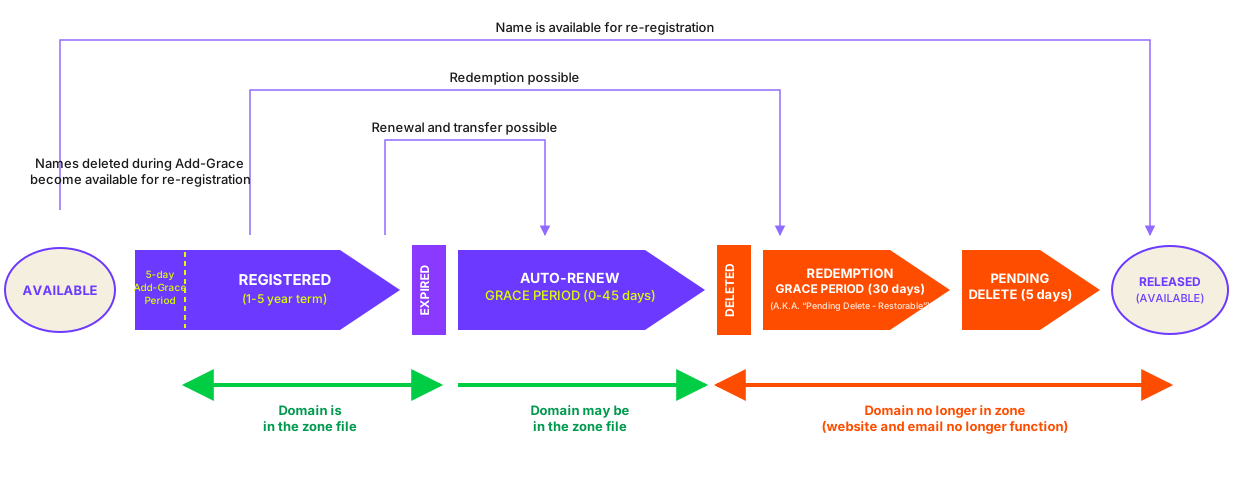
Available
The domain is not registered. No delegation records are present in the DNS, and the WHOIS system will return a "NOT FOUND" response to queries. An EPP <check> command will return an "avail" status of 1.
Registered
A Registrar submits an EPP <create> command or registers the domain name via the Registrar Console. The registration fee is deducted from the Registrar's balance. The initial registration period may be any whole number of years between one (1) and five (5).
For five (5) calendar days after the registration of the domain, the Registrar can delete the domain and receive a credit for the registration fee (subject to the Add Grace Period Limits Policy).
While the domain is registered, it is delegated to the specified name servers and will resolve normally. During this time, the Registrar may update the domain name's DNS settings, lock status and contact associations, and may extend the registration period (subject to a maximum of five (5) years) by submitting an <renew> EPP command or using the Registrar Console.
After completing the Registration Hold Period, the domain may also be transferred to a different Sponsoring Registrar. Upon such transfer, the domain name may also be renewed for one or more years. A domain can’t be renewed if the resulting term exceeds five (5) years.
Expired
When the expiry date is reached, by default the domain name is automatically renewed for a period of one year, and the renewal fee is deducted from the Registrar's account.
For forty-five (45) days after the Auto-Renewal (Auto-Renew Grace Period), the Registrar can delete the domain and receive a credit for the renewal fee.
Redemption Grace Period
Should the Registrar delete the domain, the domain enters the Redemption Grace Period. During this period, the domain name will no longer resolve as all delegation information is removed from the TLD zone.
For the first thirty (30) days after receipt of the delete request, the domain is in the "Pending Delete Restorable" state. During this time, the Registrar may submit an RGP restore request via EPP or the Registrar Console.
Upon submission of a valid Restore Request and its corresponding Renew Request, the domain is restored and returned to Active status. The intermediate Pending Restore state is transitory and typically imperceptible.
Pending Delete
Thirty (30) days after the receipt of the delete request, the domain leaves the "Pending Delete Restorable" and enters the "Pending Delete" status. The Registrar cannot submit a Restore Request during this period.
Released
Five (5) days after the domain enters the "Pending Delete" status the domain name is purged from the database and may be released once again and become available for registration.
8.2 Contact Objects.
Domain names may have a Registrant, Administrative, Technical or Billing Contacts. A contact object may have the following attributes:
- Name: the full name of the person the contact refers to, or an organizational name (i.e. "Hostmaster") - Max 255 characters.
- Company: the full name of the organization, if appropriate - Max 255 characters
- Street Address: 1-3 text fields representing the postal address - Max 255 characters each.
- City: the city or town - Max 255 characters.
- State/Province: the state, province or geographic region - Max 255 characters.
- Postcode: the postal or ZIP code of the contact - Max 16 characters.
- Country: the two-letter ISO-3166 country code for the contact. Note that “UK” may be used interchangeably with “GB”, however our server will translate “UK” into “GB” in <info> commands and WHOIS records. - Max 2 characters.
- Phone: the telephone number of the contact in e164a format. - Max 17 characters.
- Fax: the fax number of the contact in e164a format. - Max 17 characters.
- E-mail: the email address of the contact. - Max 84 characters.
Of the above, all fields are mandatory except Fax, State, Company.
8.2.1 Transfers.
Contact objects may be transferred between Registrars in the same way as domain names. Nevertheless, Registrars may find it easier to simply recreate new contact objects for recently transferred domain names, since this avoids the delay associated with contact object transfers.
8.2.2 Purging of Unused Contact Objects.
In order to comply with data protection legislation, the .CO Registry purges unused contact objects from the Registry database. When a domain is updated to remove a contact, and that contact loses the “linked” status, then it will gain the “pendingDelete” status, and will later be deleted from the database.
8.3 Host Objects.
Registrars may freely create host objects that are “out-of-bailiwick” (i.e. not subordinate to the .CO). IP address information supplied during a <CREATE> or <UPDATE> request will be ignored for such hosts, and our DNS servers will not publish glue for them.
Registrars may only create “in-bailiwick” (i.e. subordinate to the .CO zone) if they are the sponsor for the superordinate domain name. That is to say, a Registrar may only create a host object named NS0.EXAMPLE.CO if that Registrar is also the sponsor for EXAMPLE.CO. For in-bailiwick host objects, Registrars must provide at least one IPv4 or IPv6 address at creation time.
Registrars may not create host objects that are subordinate to domain names that are sponsored by other Registrars, or that are subordinate to an unregistered domain name.
8.3.1 Sponsorship and Transfers.
In-bailiwick host objects are automatically transferred when the superordinate domain name is transferred. Out-of-bailiwick host objects may not be transferred.
8.3.2 Orphan Glue.
Subordinate host objects are deleted when their parent domain is deleted. If other domains in the Registry are delegated to these hosts, then the delegation is removed.
9 EPP System.
EPP is a stateful XML protocol layered over TCP (see RFC 3734). Protected using lower- layer security protocols, clients exchange identification, authentication, and option information, and engage in a series of client-initiated command/response exchanges. All EPP commands are atomic (there is no partial success or partial failure), and designed so that they can be made idempotent (executing a command more than once has the same net effect on system state as successfully executing the command once).
EPP provides four basic service elements: service discovery, commands, responses, and an extension framework that supports the definition of managed objects and the relationship of protocol requests and responses to those objects.
EPP servers respond to client-initiated communication (which can be either a lower- layer connection request or an EPP service discovery message) by returning a greeting to the client. The server then responds to each EPP command with a coordinated response that describes the results of processing the command.
EPP commands fall into three (3) categories: session management, queries, and transform commands. Session management commands are used to establish and end persistent sessions with an EPP server. Query commands perform read-only object information retrieval operations. Transform commands perform read-write object management operations.
The server processes commands in the order they are received from a client. The protocol includes features that allow for offline review and processing of transform commands before the requested action is completed. In such situations, the response clearly notes that the command has been received, but that the requested action is pending. The corresponding object then reflects the processing of the pending action. The server will also notify the client when offline processing of the action has been completed. Object mappings describe standard formats for notices that describe the completion of offline processing.
EPP uses XML name and to identify schemas required for XML instance parsing and validation. These namespaces and schema definitions are used to identify both the base protocol and the schemas for managed objects.
9.1 Supported Objects Types.
Registrars may create and manage the following object types in the EPP system:
- Domains (RFC 5731).
- Host objects (RFC 5732).
- Contact objects (RFC 5733).
9.2 Supported Commands.
The .CO Registry supports the following EPP commands types:
- <hello> – retrieve the <greeting> from the server
- <login> and <logout> – session management
- <poll> – message queue management
- <check> – availability check
- <info> – object information
- <create> – create an object
- <update> – update an object
- <renew> – renew an object
- <delete> – delete an object
- <transfer> – manage object transfers
The EPP Server has been designed to adhere to version 1.0 of the EPP specification, as defined in RFC 5730. In addition, we have developed our EPP implementation to operate in an identical manner to those operated by other Registries, to minimize the amount of new software that must be written by Registrars wishing to provision .CO domain names. Access to the EPP server is via a TLS-encrypted TCP interface at epp.registry.co, port 700.
For examples of EPP frames for creating and managing Registry objects such as domain names, host objects and contact objects, please consult the relevant RFCs.
Contact Handling Update:
If a Registrar submits "loc" postal information, only "loc" postal information will be created. This adjustment is aimed at ensuring consistent behavior within the system.
“INT” postal info validation:
Validation for “int” postal info elements ensures that they contain only the “7-bit US-ASCII character set” in line with the RFC5733 requirements.
9.3 Operational Testing and Evaluation (OT&E).
The .CO Registry provides an Operational Testing and Evaluation (OT&E) environment to allow Registrars to develop and test their client applications. This system is identical to the production Registry system but uses a separate database. Registrars are invited to use this system to test their client implementations, without fear of affecting the production Registry system. Registrars can create multiple account credentials for use in the OT&E system via the Registrar Console.
Access to the OT&E EPP server is via a TCP interface (secured by TLS) at epp.ote.registry.co, port 700, and is not restricted by IP address. There is also a version of the Registrar Console for the OT&E system at:
https://registrar-console.ote.registry.co/
Note: Registrars are not required to complete an OT&E certification before gaining access to the production environment. All Registrars have immediate access to the production environment once their account has been activated.
9.4 How to Create Your EPP client.
9.4.1 Scope.
EPP allows you to manage pretty much everything there is to manage about a domain name. The result is in a large set of commands and variations, which probably seems overwhelming when considering implementation.
This is why we recommend taking a phased approach to your EPP implementation
- Start with a domain check command only which will get you familiar with logging in and connecting to EPP.
- Move on to a golden path*.
- From here your own effo.rt will guide you on where to focus next on your continuous improvement
* By golden, path we mean the cornerstone of domain registration, which includes creating contacts, nameservers followed by a domain.
Of course, other development best practices like test-driven development and Agile, help in make effective use of your resources. We’ll provide you with some sample test scenarios to help you on your way and leave the rest up to your own criteria.
9.4.2 Don’t Start From Scratch.
EPP has been around for a long time, and many development years have gone into developing open-source clients. Depending on which development language you are using, look for a popular, well-maintained EPP project. For example this one, or our own PHP repo. These libraries will take care of the EPP protocol itself so you can concentrate on sending and receiving the XML frames.
9.4.3 Sample Domain Check Test Frames Command.
<command>
<check>
<domain:check xmlns:domain="u:ietf:params:xml:ns:domain-1.0">
<domain:name>testdomainexample.co</domain:name>
</domain:check>
</check>
<clTRID>CLI-1765780205-6739</clTRID>
</command>
Once you get this working, move on to the golden path. Here are some sample frames for creating a contact, nameserver and domain:
9.4.4 Sample “golden path” Frames.
Create Contact Command
<command>
<create>
<contact:create xmlns:contact="u:ietf:params:xml:ns:contact-1.0">
<contact:id>CONTACT01</contact:id>
<contact:postalInfo type="loc">
<contact:name>John Doe</contact:name>
<contact:org>Example Inc.</contact:org>
<contact:addr>
<contact:street>123 Example Dr.</contact:street>
<contact:city>Bogota</contact:city>
<contact:sp>DC</contact:sp>
<contact:pc>110221</contact:pc>
<contact:cc>CO</contact:cc>
</contact:addr>
</contact:postalInfo>
<contact:voice>+1.7035555555</contact:voice>
<contact:fax>+1.7035555555</contact:fax>
<contact:email>jdoe@example.co</contact:email>
<contact:authInfo>
<contact:pw>Abcd1234</contact:pw>
</contact:authInfo>
</contact:create>
</create>
<clTRID>CLI-1765781242-4364</clTRID>
</command>
</epp>
Create Contact Response
<response>
<result code="1000">
<msg>Command completed successfully.</msg>
</result>
<resData>
<contact:creData
xmlns:contact="u:ietf:params:xml:ns:contact-1.0">
<contact:id>CONTACT01</contact:id>
<contact:crDate>2025-12-15T06:47:22.0Z</contact:crDate>
</contact:creData>
</resData>
<trID>
<clTRID>CLI-1765781242-4364</clTRID>
<svTRID>CNIC-654939ADB59594D554863B805FF27A319D31ABBBA1A2D7CD7FF474F51F9</svTRID>
</trID>
</response>
Create Host Command
<command>
<create>
<host:create xmlns:host="urn:ietf:params:xml:ns:host-1.0">
<host:name>ns1.testdomainexample.co</host:name>
<host:addr ip="v4">192.0.2.2</host:addr>
<host:addr ip="v4">192.0.2.29</host:addr>
<host:addr ip="v6">1080:0:0:0:8:800:200C:417A</host:addr>
</host:create>
</create>
<clTRID>HOST-1765782831-9035</clTRID>
</command>
Create Host Response
<response>
<result code="1000">
<msg>Command completed successfully.</msg>
</result>
<resData>
<host:creData xmlns:host="urn:ietf:params:xml:ns:host-1.0">
<host:name>ns1.testdomainexample.co</host:name>
<host:crDate>2025-12-15T00:00:00.0Z</host:crDate>
</host:creData>
</resData>
<trID>
<clTRID>HOST-1765782831-9035</clTRID>
<svTRID>CNIC-C5C6E21F6C51C88732613F06CB1A26CC1E6CF1B442B989BA2EA16E477F9</svTRID>
</trID>
</response>
Create Domain Command
<command>
<create>
<domain:create xmlns:domain="u:ietf:params:xml:ns:domain-1.0">
<domain:name>domainexample.co</domain:name>
<domain:period unit="y">1</domain:period>
<domain:registrant>CONTACT01</domain:registrant>
<domain:contact type="admin">CONTACT02</domain:contact>
<domain:contact type="tech">CONTACT03</domain:contact>
<domain:contact type="billing">CONTACT04</domain:contact>
</domain:create>
</create>
<clTRID>CLI-1765783250-3313</clTRID>
</command>
Create Domain Response
<response>
<result code="1000">
<msg>Domain DOMAINEXAMPLE.CO created successfully with ROID D71411-CNIC</msg>
</result>
<resData>
<domain:creData xmlns:domain="urn:ietf:params:xml:ns:domain-1.0">
<domain:name>domainexample.co</domain:name>
<domain:crDate>2025-12-15T07:20:51.0Z</domain:crDate>
<domain:exDate>2026-12-15T23:59:59.0Z</domain:exDate>
</domain:creData>
</resData>
<trID>
<clTRID>CLI-1765783250-3313</clTRID>
<svTRID>CNIC-31AF4903E53B440B395F75BE4AE892D518DB5BF89F7ECB91949D0BD5859</svTRID>
</trID>
</response>
When you are familiar with the domain checks and golden flow, you will find plenty of information in this document that will allow you to dig a little deeper and expand as your business needs occur.
9.5 The Shared Registry System.
9.5.1 Domain Names.
Allocation of domain names using pre-generated authInfo codes.
Certain domain names may be registered by means of a pre-generated authInfo code. Once generated and associated with a domain name, that domain name may not be allocated unless the Registrar inserts the correct code into the <domain:pw> element of the <create> command.
For example, say that the domain EXAMPLE.CO has been associated with the authInfo code “Abcd1234”. The domain remains available for registration, but a <create> command will only be successful if the authInfo code above is supplied in the <create> command like so:
<command>
<create>
<domain:create xmlns:domain="u:ietf:params:xml:ns:domain-1.0">
<domain:name>domainexample.co</domain:name>
<domain:period unit="y">1</domain:period>
<domain:registrant>CONTACT01</domain:registrant>
<domain:contact type="admin">CONTACT02</domain:contact>
<domain:contact type="tech">CONTACT03</domain:contact>
<domain:contact type="billing">CONTACT04</domain:contact>
<domain:authInfo>
<domain:pw>Abcd1234</domain:pw>
</domain:authInfo>
</domain:create>
</create>
<clTRID>CLI-1765783250-3313</clTRID>
</command>
Once generated, the authInfo code may be used by any Registrar. authInfo codes will typically be generated by the Registry and then passed to a registrant, who will present the code to their preferred Registrar.
Once the domain has successfully been allocated, the sponsoring Registrar may use the <update> command to change the authInfo code for the domain as per its own policies.
Domain status codes
EPP Registrars may add or remove the following EPP status codes to domain names:
- clientHold – NS records will not be entered into the zone for the domain name while this status code is applied.
- clientTransferProhibited – Transfer requests for this domain name will be automatically rejected while this status code is applied.
- clientRenewProhibited – When this status code is applied, all requests by the sponsoring client to renew the domain are rejected.
- clientUpdateProhibited – When this status code is applied, all requests by the sponsoring client to update the domain name are rejected (except if the request includes removing this status from the domain name).
- clientDeleteProhibited – When this status code is applied, all requests by the sponsoring client to delete the domain name are rejected.
9.5.2 Contact Objects.
When constructing an EPP <create> or <update> frame, Registrars MUST supply an internationalized form for address data (see RFC 5733). Internationalized address information MUST be composed solely from characters from the ASCII range. Registrars MAY also provide localized address data, which MAY contain any valid UTF-8 code point.
Please note that contact IDs, whether server or client assigned, are case-insensitive. That is, you cannot create an object with an identifier of abc-12345 if an object with an identifier of ABC-12345 already exists. If you perform an EPP request for object abc-12345, information about ABC-12345 will be returned.
9.5.3 Disclosure of Contact Information.
Registrars may use the <contact:disclose> element to enable display of contact attributes in WHOIS and RDAP records. By default, all contact attributes are opted-out of display*. When performing a <create> or <update> command, the <contact:disclose> element may be used to enable disclosure of specific contact attributes, as per RFC 5733 Section 2.9:
<contact:disclose flag="1">
<contact:name type="int"/>
<contact:name type="loc"/>
<contact:org type="int"/>
<contact:org type="loc"/>
<contact:addr type="int"/>
<contact:addr type="loc"/>
<contact:voice/>
<contact:fax/>
<contact:email/>
</contact:disclose>
An <update> command which contains a <contact:disclose> with a “flag” attribute of “0” or “false” will remove the specified attributes from display.
Performing <info> Commands on Objects
Domains
The EPP system allows Registrars to submit <info> commands on domains without restrictions of the sponsoring registrar.
However, the .CO Registry does not send the authInfo as a reply to <info> commands. Authorization codes are never disclosed through EPP queries. Registrars are required to change the authInfo for a domain and use the new code when required by registrants.
If registrant requires an authInfo and the Registrar is unsure of the code: 1. Reset the authInfo to a new code. 2. Provide this new code to the Registrant.
Contacts
The EPP system allows Registrars to submit <info> commands on contact objects under the following conditions:
- When the contact object is sponsored by the Registrar, the <info> command may be performed using only the contact ID. No authorization code is required.
- When the contact object is not sponsored by the Registrar, the <info> command will be rejected unless a valid authorization code is provided in the <contact:pw> element. If a valid authorization code is included, the Registry will return the full contact information.
9.5.4 Host Objects.
Registrars can change the IP addresses associated with a host object using the EPP <host:update> command. The <update> command also permits changing the DNS name of a host object, but with the following conditions:
- Registrars may not rename a host object that is not subordinate to a domain name under their sponsorship. This includes “out-of-bailiwick” host objects.
- Registrars may not rename a host object so that it becomes subordinate to a domain name that is sponsored by another Registrar;
- Registrars may not rename a host object so that it becomes subordinate to a non-existent domain name;
Changes to the DNS name of a given host are applied to the NS records of all domain names that are delegated to that host. This means that it is possible that domain names sponsored by other Registrars could be affected by renaming a host object: as a result, Registrars should exercise caution when using this feature and consider using an alternative solution instead (such as creating a new host object and updating any domain names).
9.6 Credentials and Access Control.
Registrars are issued with a username (their Registrar ID) and a password. This password cannot be used to access any other service and only this password can be used to access the EPP system. Registrar officers with the "Management" access level can change their EPP password via the Registrar Console.
The .CO Registry does not require that Registrars connect using an SSL certificate. This type of connection is optional in the .CO Registry. A certificate may be obtained from a recognized certificate authority, or it may be a self-signed certificate registered with the .CO Registry via the Registrar Console. Registrar officers with the "Management" access level or above can upload SSL certificates for their account.
Registrars may also choose to connect via EPP from an allowed IP address (approved in the Registrar Console) without the need for the SSL Certificate.
9.7 Session Limits, Transaction Volumes and Fair Use Policy.
9.7.1 During Normal Operations.
During normal operations, Registrars may maintain up to 100 concurrent sessions to the EPP system. Check Commands are limited to 50 objects per command. Other command throughput is not throttled, meaning that the server will respond to commands immediately (once the command has been processed and the response has been prepared).
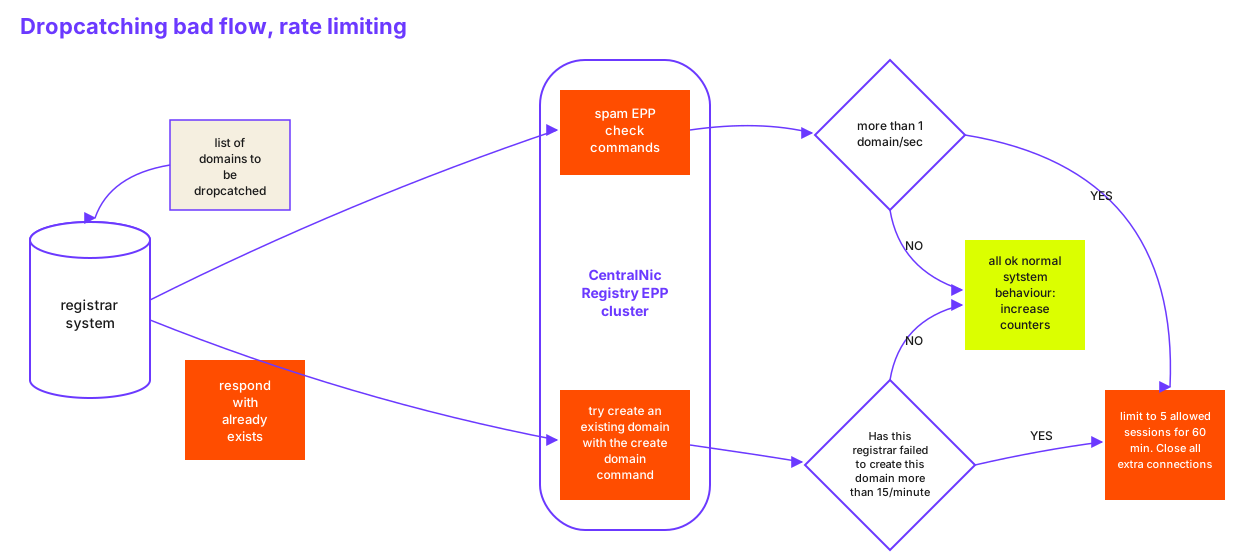
As an exception to the above, domain <create> commands which result in a 2302 “object exists” error will be subject to a minimum 2-second round-trip time. This policy serves to mitigate the operational impact of “drop-catching” activity on the Registry system.
9.7.2 Session Timeouts.
The system will terminate an idle session if no command has been received after 300 seconds. Registrars may wish to use the <hello> command to maintain connections for longer than this period. Please note that care should be taken to avoid a timeout when using pipelining.
9.7.3 Fair Use Policy.
The .CO Registry has an obligation to ensure the availability, stability and reliability of the Shared Registry System for all Registry partners and Registrars. We reserve the right to take action to maintain the stability of the Registry in the face of exceptional, abusive or malicious Registrar activity, even if that activity falls within the limits outlined elsewhere in this document.
The .CO Registry may limit a Registrar’s access to any and all features of the Shared Registry System, on a temporary or indefinite basis, where required to meet our obligations to other Registrars. This includes (but is not limited to):
- Restricting the number of EPP connections that the Registrar may maintain;
- rate-limiting specific EPP commands (globally or for specific objects); and
- enabling of response caching (so that the Registrar does not receive real-time updates to query commands).
All Registrars are expected to apply reasonable efforts to ensure that their EPP and WHOIS/RDAP implementations comply with the relevant protocol specifications and best practices. Such best practices include (but are not limited to):
- Checking the response code received from the server before retrying a failed command (since the response code may indicate a permanent error, meaning that the command can never result in a successful response);
- Delaying resubmission of commands when a “rate limiting” response (such as a 429 response to RDAP queries) is returned;
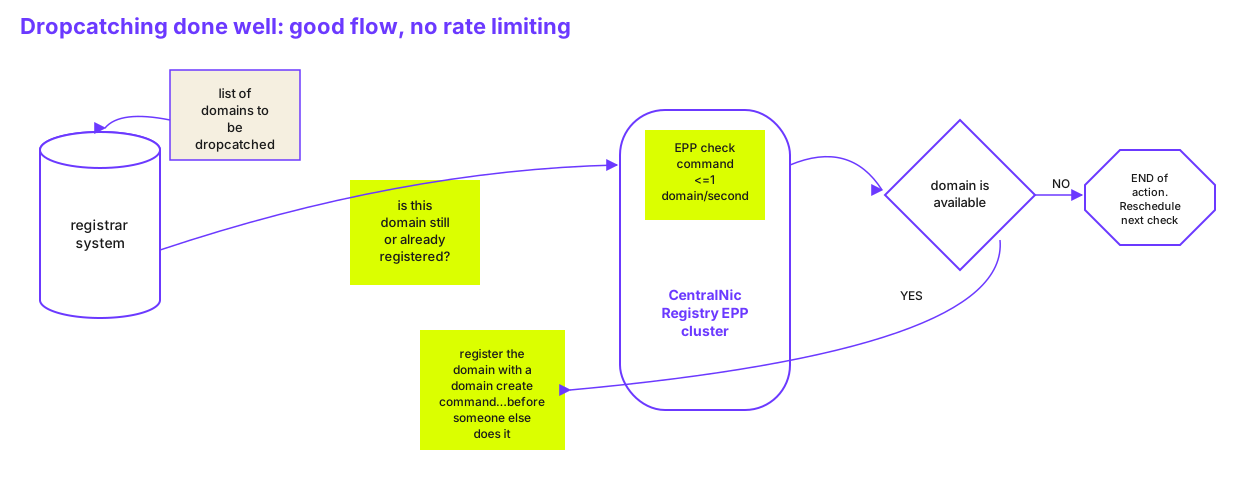
- Using the <check> command to determine availability before submitting a <create> command;
- Not submitting more than one EPP <check> (or RDAP HEAD) request per second for the same object;
- Use the response code of the <create> command to determine the outcome of the request, instead of doing an immediate <check> command;
- Checking the response code returned to a <login> command, as it may indicate that your account has been rate-limited.
9.8 Transaction Logging and Reporting.
All “transform” commands are logged. Transform commands are: <create>, <renew>, <update>, <delete> and <transfer>. The system logs the time and date when the command was received, the Registrar that submitted it, the result code, and message. All commands, whether successful or not, are logged (except for domain <create> commands which result in a 2302 response).
Registrars have access to the log for their account via the Registrar Console. The log viewer permits filtering by command, object type, object ID (domain, hostname, contact ID), result code and timestamp.
Query commands (<check>, <info>, <poll op="req">) and session commands (<login>, <logout> and <hello>) are not logged due to the large volume of such queries (particularly <check> queries).
9.9 Immediate re-registration of Purged Domains (“drop-catching”).
In order to mitigate any operational impact from this activity, to maintain the stability of the shared Registry system, and ensure equal access to all Registrars, the following policies are in place.
- Each Registrar account is normally restricted to 100 concurrent connections to the EPP system.
- If the EPP system receives a domain <create> command, for which the response code is 2302 (object exists), the server will wait until 2,000 milliseconds have elapsed (from the time when the processing of the command began) before sending the response back to the client.
- Rather than purging domains in a single batch once per day, domains are purged throughout the day, normally within 60-120 seconds of exiting the five (5) day Redemption Hold Period (RHP).
- Registrars who wish to perform drop-catching activity can use the Domain Drop List files (available from the FTP service) to determine the approximate time when a given domain will be purged.
The .CO Registry reserves the right to amend these policies at any time in order to preserve the stability of the Registry system and ensure equal access to all Registrars.
As a reference of good practice we have included an example of good practice regarding drop catching.
Here is also an example of what will result in being flagged as unfair use of the platform and the potential limiting of sessions for your Registrar account:
9.9.1 Additional Limit on drop-catching.
- The number of commands will be deemed excessive if the Registrar account generates more than 2 million <check> or failed <create> commands per day, or more than 50,000 such commands for each domain registered.
9.10 XML Schema Validation.
The EPP system automatically validates all request frames against the XSD schema definitions provided in the RFCs. Should a non-validating request be received, an error is returned to the client. Registrars can validate their commands using the OT&E environment, or by using the EPP Frame Validator on the Registrar Console.
9.11 Message Queue.
EPP provides a message queue system to provide Registrars with notifications for out-of-band events. Registrars can choose to enable or disable the use of the message queue via the Account Settings page of the Registrar Console. The Registrar Console also provides access to the message queue. The .CO Registry currently supports the following EPP messages:
- Notification of approved inbound transfer
- Notification of rejected inbound transfer
- Notification of new outbound transfer
- Notification of cancelled outbound transfer
- Purge of a domain on the pendingDelete status Example frames for these events are given below.
9.11.1 Notification of Approved Inbound Transfer.
<?xml version="1.0" encoding="UTF-8" standalone="no"?>
<epp xmlns="urn:ietf:params:xml:ns:epp-1.0">
<response>
<result code="1301">
<msg>Command completed successfully; ack to dequeue.</msg>
</result>
<msgQ count="1" id="1315705">
<qDate>2025-12-15T08:26:01.0Z</qDate>
<msg>Transfer approved.</msg>
</msgQ>
<resData>
<domain:trnData xmlns:domain="urn:ietf:params:xml:ns:domain-1.0">
<domain:name>testdomainexample.com.co</domain:name>
<domain:trStatus>clientApproved</domain:trStatus>
<domain:reID>H629</domain:reID>
<domain:reDate>2025-12-15T08:24:50.0Z</domain:reDate>
<domain:acID>H509</domain:acID>
<domain:acDate>2025-12-20T08:24:50.0Z</domain:acDate>
<domain:exDate>2027-05-15T23:59:59.0Z</domain:exDate>
</domain:trnData>
</resData>
<trID>
<clTRID>ClientTRX</clTRID>
<svTRID>CNIC-D2D1C95703F5E19691BA136BA4F6F5FB144BB14C81F45AB3DD013B1E410</svTRID>
</trID>
</response>
</epp>
Note: that the <domain:trStatus> element may also have the value “serverApproved”.
9.11.2 Notification of Rejected Inbound Transfer.
<?xml version="1.0" encoding="UTF-8" standalone="no"?>
<epp xmlns="urn:ietf:params:xml:ns:epp-1.0">
<response>
<result code="1301">
<msg>Command completed successfully; ack to dequeue.</msg>
</result>
<msgQ count="1" id="1309468">
<qDate>2025-12-15T07:53:01.0Z</qDate>
<msg>Transfer rejected.</msg>
</msgQ>
<resData>
<domain:trnData xmlns:domain="urn:ietf:params:xml:ns:domain-1.0">
<domain:name>testdomainexample.com.co</domain:name>
<domain:trStatus>clientRejected</domain:trStatus>
<domain:reID>H629</domain:reID>
<domain:reDate>2025-12-15T07:43:12.0Z</domain:reDate>
<domain:acID>H509</domain:acID>
<domain:acDate>2025-12-20T07:43:12.0Z</domain:acDate>
<domain:exDate>2027-05-15T23:59:59.0Z</domain:exDate>
</domain:trnData>
</resData>
<trID>
<clTRID>ClientTRX</clTRID>
<svTRID>CNIC-215E3D8CB509CEDEF6010E30E3DA4F598B22AF5F56DB3304357F9B7913E</svTRID>
</trID>
</response>
</epp>
Note: that the <domain:trStatus> element may also have the value “serverRejected”.
9.11.3 Notification of New Outbound Transfer.
<epp xmlns="urn:ietf:params:xml:ns:epp-1.0">
<response>
<result code="1301">
<msg>Command completed successfully; ack to dequeue.</msg>
</result>
<msgQ count="1" id="1309396">
<qDate>2025-12-15T07:44:01.0Z</qDate>
<msg>Transfer requested.</msg>
</msgQ>
<resData>
<domain:trnData xmlns:domain="urn:ietf:params:xml:ns:domain-1.0">
<domain:name>testdomainexample.com.co</domain:name>
<domain:trStatus>pending</domain:trStatus>
<domain:reID>H629</domain:reID>
<domain:reDate>2025-12-15T07:43:12.0Z</domain:reDate>
<domain:acID>H509</domain:acID>
<domain:acDate>2025-12-20T07:43:12.0Z</domain:acDate>
<domain:exDate>2027-05-15T23:59:59.0Z</domain:exDate>
</domain:trnData>
</resData>
<trID>
<clTRID>poll-req-1765784667-3349</clTRID>
<svTRID>CNIC-AB7299FE23AB7B665A95521B46840CA9DAA874AB6A9F5432428AA492664</svTRID>
</trID>
</response>
</epp>
9.11.4 Notification of cancelled Outbound Transfer.
<?xml version="1.0" encoding="utf-8" standalone="no"?>
<epp xmlns="urn:ietf:params:xml:ns:epp-1.0">
<response>
<result code="1301">
<msg>Command completed successfully; ack to dequeue.</msg>
</result>
<msgQ count="1" id="12345" />
<resData>
<domain:trnData xmlns:domain="urn:ietf:params:xml:ns:domain-1.0">
<domain:name>example.co</domain:name>
<domain:trStatus>clientCancelled</domain:trStatus>
<domain:reID>H12345</domain:reID>
<domain:reDate>2011-01-27T23:50:00.0Z</domain:reDate>
<domain:acID>H54321</domain:acID>
<domain:acDate>2011-02-01T23:50:00.0Z</domain:acDate>
</domain:trnData>
</resData>
<trID>
<clTRID>abc123</clTRID>
<svTRID>321cba</svTRID>
</trID>
</response>
</epp>
9.11.5 Status Change of a Domain on the pendingDelete Status.
When a domain is purged, our system will look in the EPP transaction log for the most recent successful (response code 1001) <delete> command for the domain, submitted by the current sponsoring Registrar. If a log entry is found, a message will be queued to confirm that the domain has finally been purged.
<?xml version="1.0" encoding="UTF-8" standalone="no"?>
<epp xmlns="urn:ietf:params:xml:ns:epp-1.0">
<response>
<result code="1301">
<msg>Command completed successfully; ack to dequeue.</msg>
</result>
<msgQ count="1" id="1293853">
<qDate>2025-12-14T10:03:03.0Z</qDate>
<msg>Pending action completed successfully.</msg>
</msgQ>
<resData>
<domain:panData xmlns:domain="urn:ietf:params:xml:ns:domain-1.0">
<domain:name paResult="1">testdomainexample.com.co</domain:name>
<domain:paTRID>
<clTRID>ClientTRX</clTRID>
<svTRID>CNIC-9DD090E594945839FD447E360C89C4362F45F61A0A2EB3226890D4070F8</svTRID>
</domain:paTRID>
<domain:paDate>2025-12-14T10:03:03.0Z</domain:paDate>
</domain:panData>
</resData>
<trID>
<clTRID>ClientTRX</clTRID>
<svTRID>CNIC-BB4FC57A072A836D92CE53CEE736B3C23EA902CA959157CBDE35E4CFF90</svTRID>
</trID>
</response>
</epp>
9.12 Extensions.
CentralNic’s EPP system supports a number of extensions: These are listed below.
9.12.1 Registry Grace Period Mapping.
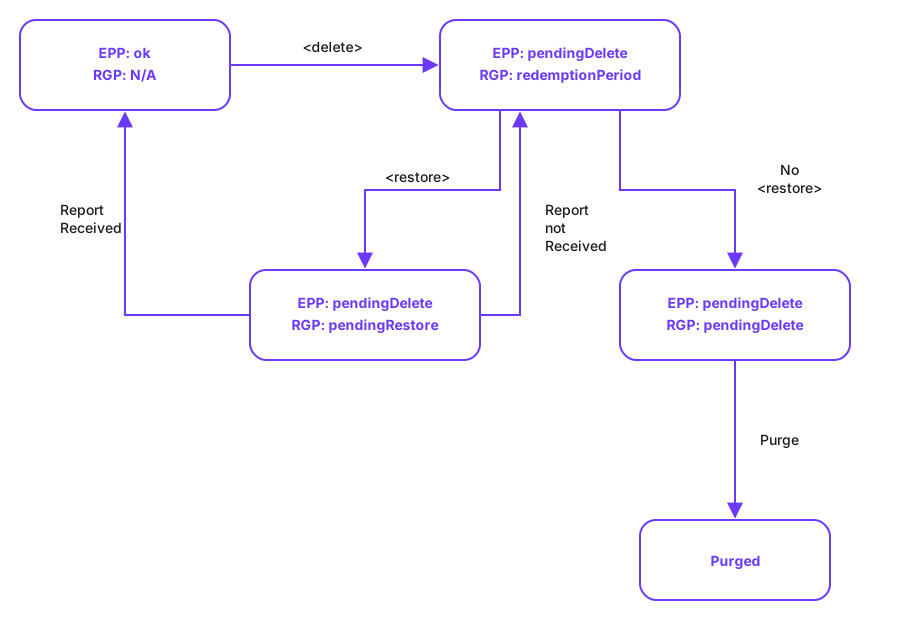
This extension (described in RFC 3915) implements the "grace period" policies defined by ICANN. Grace period policies exist to allow protocol actions to be reversed or otherwise revoked during a short period of time after the protocol action has been performed. The grace periods supported are fully described in Section 10.1.5. The state diagram below describes how the RGP state of a domain changes during the RGP lifecycle.
Domain Info Command
If a domain name has an RGP status, then the EPP <info> response frame is extended to describe the status. An example response frame is below:
<?xml version="1.0" encoding="UTF-8" standalone="no"?>
<epp xmlns="urn:ietf:params:xml:ns:epp-1.0">
<response>
<result code="1000">
<msg>Command completed successfully.</msg>
</result>
<resData>
<domain:infData xmlns:domain="urn:ietf:params:xml:ns:domain-1.0">
<domain:name>testdomainexample.co</domain:name>
<domain:roid>D71393-CNIC</domain:roid>
<domain:status s="inactive" />
<domain:registrant>CONTACT01</domain:registrant>
<domain:contact type="tech">CONTACT01</domain:contact>
<domain:contact type="admin">CONTACT01</domain:contact>
<domain:contact type="billing">CONTACT01</domain:contact>
<domain:host>ns1.testdomainexample.co</domain:host>
<domain:host>ns2.testdomainexample.co</domain:host>
<domain:clID>H16871</domain:clID>
<domain:crID>H16871</domain:crID>
<domain:crDate>2025-12-15T06:59:58.0Z</domain:crDate>
<domain:upDate>2025-12-15T06:59:58.0Z</domain:upDate>
<domain:exDate>2026-12-15T23:59:59.0Z</domain:exDate>
</domain:infData>
</resData>
<extension>
<rgp:infData xmlns:rgp="urn:ietf:params:xml:ns:rgp-1.0">
<rgp:rgpStatus s="addPeriod" />
</rgp:infData>
</extension>
<trID>
<clTRID>CLI-1765787486-3599</clTRID>
<svTRID>CNIC-04042E149BEE3FEF6F02B22D06FF77167A0CF7A1F26DB90755E11712A17</svTRID>
</trID>
</response>
</epp>
Restoring a domain on the redemptionPeriod (Redemption Grace Period) status
If a domain name has the redemptionPeriod RGP status, then it can be restored from Pending Delete using an extended <update> command. An example is below.
<?xml version="1.0" encoding="utf-8" standalone="no"?>
<epp xmlns="urn:ietf:params:xml:ns:epp-1.0">
<command>
<update>
<domain:update xmlns:domain="urn:ietf:params:xml:ns:domain-1.0">
<domain:name>example.co</domain:name>
<domain:chg />
</domain:update>
</update>
<extension>
<rgp:update xmlns:rgp="urn:ietf:params:xml:ns:rgp-1.0">
<rgp:restore op="request" />
</rgp:update>
</extension>
<clTRID>ABC-12345</clTRID>
</command>
</epp>
Restore Reports
The .CO Registry does not currently require Registrars to submit a “Restore Report” as part of an RGP restore.
9.12.2 DNSSEC Extension.
This extension (described in RFC 5910) provides an interface for Registrars to submit DNSSEC Delegation Signer (DS) records for domain names in the Registry. These are then published in the DNS alongside the delegation for the domain, allowing a resolver to establish a chain of trust from the root zone to the domain.
The .CO Registry’s implementation of this extension uses the “thin” DS Data Interface, rather than the “thick” Key Data Interface (see RFC 5910, §4). Registrars should insert the <secDNS:dsData> (and its child elements) element into <create> and <update> commands. If the <secDNS:keyData> element is included, it will be stored but is not validated or used. The <secDNS:maxSigLife> element is not supported and will be ignored.
9.12.3 IDN Extension.
CentralNic supports the extension for supplying IDN table information specified at: http://tools.ietf.org/html/draft-obispo-epp-idn-03
Use of this extension is OPTIONAL: it is not required for non-IDN domains. However, if the client includes the XML namespace for this extension in the <svcExtension> element of its login frame, it MUST be used when submitting a <create> command for an IDN domain.
An example of an extended EPP <create> command is below.
<?xml version="1.0" encoding="utf-16" standalone="no"?>
<epp xmlns="urn:ietf:params:xml:ns:epp-1.0">
<command>
<create>
<domain:create xmlns:domain="urn:ietf:params:xml:ns:domain-1.0">
<domain:name>xn--espaol-zwa.co</domain:name>
<domain:period unit="y">1</domain:period>
<domain:ns>
<domain:hostObj>ns1.testdomainexample.co</domain:hostObj>
<domain:hostObj>ns2.testdomainexample.co</domain:hostObj>
</domain:ns>
<domain:registrant>CONTACT01</domain:registrant>
<domain:contact type="admin">CONTACT02</domain:contact>
<domain:contact type="tech">CONTACT03</domain:contact>
<domain:contact type="billing">CONTACT04</domain:contact>
<domain:authInfo>
<domain:pw>Password1234</domain:pw>
</domain:authInfo>
</domain:create>
</create>
<extension>
<idn:data xmlns:idn="urn:ietf:params:xml:ns:idn-1.0">
<idn:table>es</idn:table>
<idn:uname>xn--espaol-zwa.co</idn:uname>
</idn:data>
</extension>
<clTRID>CLI-1767821528-7820</clTRID>
</command>
</epp>
The <idn:uname> element is optional, but if included, MUST match the A-label in the <domain:name> element.
IDN Table Codes
CentralNic maintains a list of the supported IDN tables at the following URL. This page also contains links to the IDN tables themselves, which can be downloaded in a machine-readable format. The page also provides the mnemonic codes for each table.
https://Registry.co/idn-tables/
9.12.4 Fee Extension.
The Fee extension can be used to query for the fee associated with a given transaction for a domain name and command. The extension is specified at:
http://tools.ietf.org/html/draft-brown-epp-fees-02
Please see the final section of this document for further information on Premium pricing for .CO domain names.
Note that the fee extension enforced for the .CO Registry is version 1.0.
Use of the Fee Extension with Premium Domain Names
The Fee Extension MUST be used when performing a billable transaction with premium domain names. A premium domain is defined as any domain that is not billed at the base price for registrations, renewals and transfers.
The following rules apply to premium names:
- Registrars who wish to register or manage premium names MUST include the XML namespace of the Fee Extension in the <login> frame of a new EPP session.
- Participating Registrars MUST include the applicable extension element in ALL billable transactions for premium domains. These commands are: <create>, <transfer> (with op="request") and <renew>.
- The value of the <fee:fee> element MUST match the value stored in the Registry database for this domain. If the value does not match, then the transaction will be rejected.
- Registrars who do not wish to support premium names can simply ignore or omit the Fee Extension from their command frames, and the .CO Registry will reject any billable commands for premium domains.
Use of the Fee Extension for Standard Domain Names
Registrars are not required to use the Fee Extension to submit fee information for standard price domain names. However, if the fee information is submitted, it MUST be correct.
Supported Fee Descriptions and Domain Classes
Our server supports the following values for the “description” attribute of <fee:fee> elements:
| Value | Description |
|---|---|
| “Premium Registration Fee” | The fee charged for the first year of registration. |
| “Premium Renewal Fee” | The fee charged for all years subsequent to the first year. |
| “Restore Fee” | The fee charged to restore a domain from the Redemption Grace Period. |
In <check> and <info> responses, our server will use the following values for the <fee:class> element:
| Class | Description |
|---|---|
| standard | the domain name has the standard price |
| premium | the domain has a non-standard premium price |
Determining whether a domain name has a premium price
Registrars who use the Fee extension can determine whether a domain has a premium price by using the <fee:class> element described above. If the value of this element is “premium”, then the domain is a premium domain. We also publish complete lists of all premium domains via FTP. If a domain appears in a pricing file, then it has a premium price.
Note: Premium domains in the .CO Registry may have a premium registration and a premium renewal price.
OT&E Testing
Premium pricing data is replicated to the OT&E system, so Registrars can test their client implementation using the premium pricing data obtained from the production data files.
See the below example for a premium domain name query. See the final section of this document for further information and examples.
<?xml version="1.0" encoding="utf-16" standalone="no"?>
<epp xmlns="urn:ietf:params:xml:ns:epp-1.0">
<command>
<check>
<domain:check xmlns:domain="urn:ietf:params:xml:ns:domain-1.0">
<domain:name>1126premium-20.co</domain:name>
</domain:check>
</check>
<extension>
<fee:check xmlns:fee="urn:ietf:params:xml:ns:epp:fee-1.0">
<fee:command name="create">
<fee:period unit="y">1</fee:period>
</fee:command>
<fee:command name="renew">
<fee:period unit="y">1</fee:period>
</fee:command>
<fee:command name="restore">
<fee:period unit="y">1</fee:period>
</fee:command>
</fee:check>
</extension>
<clTRID>CLI-1767819157-7054</clTRID>
</command>
</epp>
<?xml version="1.0" encoding="utf-16" standalone="no"?>
<epp xmlns="urn:ietf:params:xml:ns:epp-1.0">
<response>
<result code="1000">
<msg>Command completed successfully.</msg>
</result>
<resData>
<domain:chkData xmlns:domain="urn:ietf:params:xml:ns:domain-1.0">
<domain:cd>
<domain:name avail="1">1126premium-20.co</domain:name>
</domain:cd>
</domain:chkData>
</resData>
<extension>
<fee:chkData xmlns:fee="urn:ietf:params:xml:ns:epp:fee-1.0">
<fee:currency>USD</fee:currency>
<fee:cd avail="1">
<fee:objID>1126premium-20.co</fee:objID>
<fee:class>premium</fee:class>
<fee:command name="create" standard="0">
<fee:period unit="y">1</fee:period>
<fee:fee description="Premium Registration Fee" refundable="1" grace-period="P5D">1000.00</fee:fee>
</fee:command>
<fee:command name="renew" standard="0">
<fee:period unit="y">1</fee:period>
<fee:fee description="Premium Renewal Fee" refundable="1" grace-period="P5D">100.00</fee:fee>
</fee:command>
<fee:command name="restore" standard="0">
<fee:fee description="Restore Fee" refundable="0">40.00</fee:fee>
</fee:command>
</fee:cd>
</fee:chkData>
</extension>
<trID>
<clTRID>CLI-1767819157-7054</clTRID>
<svTRID>CNIC-57D82845F740A5DA363BE32CDE2A70BF6B7C4F41F583A644ED5209B394C</svTRID>
</trID>
</response>
</epp>10 Additional Registry Services.
10.1 Registry Lock Service.
The Registry Lock Service is not provided in the .CO Registry.
11 Billing FAQ.
When do invoices get generated?
- Invoices are generated at the end of every month, and posted to the Registrar Console at: https://registrar-console.registry.co.
Does a Registrar get charged for transactions that have not completed their grace period?
- No. Registrars only get charged for transactions that have completed their grace period.
When a restore is made to a domain in pendingDelete status, does the Registrar need to do a renew?
- Yes, Registrars need to send a Renew command after a Restore command to complete the process of restoring the domain name.
When a restore is made to a domain that had previously been Autorenewed does the Autorenew transaction get processed to the invoice?
- Registrars are required to restore and renew domains for a restore transaction. Please perform a Renew command in order to complete the restoration of a domain name.
Do transfers get charged after the grace period?
- Since Transfers include a Renewal transaction, Transfers only get charged once the Renew Grace Period ends.
Where can a Registrar download the monthly invoice?
- Informative invoices will be generated at the end of every month and are available in the Registrar Console at: https://registrar-console.registry.co in section “Payments and Billing” – “Billing History”.
Who is the invoicing entity for accounting purposes?
- The .CO Registry is operated by Consorcio Equipo Puntoco, a Colombian consortium with identification number: 901.959.296-8 and address: KR 6 77 42, Bogotá, Colombia.
Is my remaining balance affected by an Autorenew that has not yet been billed?
- No. Your balance is only affected by explicit registrations and explicit renews and only after the grace period has completed. Autorenewals deduct your balance only when their grace period ends.
12 .CO Premium Domain Program.
12.1 General.
This program introduces high-value inventory to the channel, utilizing ten (10) distinct pricing tiers.
Key implementation requirements:
- Protocol: Registrars must support the EPP Fee Extension to register these domains.
- Currency: All transactions are settled in USD.
| Tier Code | Registration (USD) | Renewal (USD) | Transfer (USD) | Restore Surcharge* (USD) |
|---|---|---|---|---|
| Tier 10 | $10,000.00 | $10,000.00 | $10,000.00 | $40.00 |
| Tier 9 | $5,000.00 | $5,000.00 | $5,000.00 | $40.00 |
| Tier 8 | $3,750.00 | $3,750.00 | $3,750.00 | $40.00 |
| Tier 7 | $2,500.00 | $2,500.00 | $2,500.00 | $40.00 |
| Tier 6 | $1,000.00 | $1,000.00 | $1,000.00 | $40.00 |
| Tier 5 | $500.00 | $500.00 | $500.00 | $40.00 |
| Tier 4 | $250.00 | $250.00 | $250.00 | $40.00 |
| Tier 3 | $100.00 | $100.00 | $100.00 | $40.00 |
| Tier 2 | $50.00 | $50.00 | $50.00 | $40.00 |
| Tier 1 | $30.00 | $30.00 | $30.00 | $40.00 |
- Renewal policy: All premium domains operate on a Premium Renewal model. The price to renew or transfer a domain is the same as the initial registration price.
- Restore policy: The cost to restore a deleted premium domain is the Standard Restore Surcharge ($40) plus the Premium Renewal Fee.
12.2 Premium Pricing Tiers.
The Registry has defined the following ten (10) tiers. Registrars should map these costs to their internal pricing engines immediately.
- Restore will trigger an Auto-Renew: Total Cost = Restore Surcharge ($40) + Premium Renewal Fee. You will only need to confirm the restore price on the EPP restore command.
12.3 EPP Command Examples.
The following examples utilize the namespace urn:ietf:params:xml:ns:epp:fee-1.0.
12.3.1 Checking for Premium Status (domain:check).
Registrars must check if a domain is premium before attempting registration. The Registry response includes standard="0" and the class of the premium tier.
Request:
<?xml version="1.0" encoding="UTF-8"?>
<epp xmlns="urn:ietf:params:xml:ns:epp-1.0">
<command>
<check>
<check xmlns="domain" xmlns:domain="urn:ietf:params:xml:ns:domain-1.0">
<name xmlns="domain">1126premium-5.co</name>
</check>
</check>
<extension>
<check xmlns="fee" xmlns:fee="urn:ietf:params:xml:ns:epp:fee-1.0">
<command xmlns="fee" name="create"></command>
<command xmlns="fee" name="renew"></command>
<command xmlns="fee" name="restore"></command>
<command xmlns="fee" name="transfer"></command>
</check>
</extension>
</command>
</epp>
Response:
<?xml version="1.0" encoding="UTF-8" standalone="no"?>
<epp xmlns="urn:ietf:params:xml:ns:epp-1.0">
<response>
<result code="1000">
<msg>Command completed successfully.</msg>
</result>
<resData>
<chkData xmlns="domain" xmlns:domain="urn:ietf:params:xml:ns:domain-1.0">
<cd xmlns="domain">
<name xmlns="domain" avail="1">1126premium-5.co</name>
</cd>
</chkData>
</resData>
<extension>
<chkData xmlns="fee" xmlns:fee="urn:ietf:params:xml:ns:epp:fee-1.0">
<currency xmlns="fee">USD</currency>
<cd xmlns="fee" avail="1">
<objID xmlns="fee">1126premium-5.co</objID>
<class xmlns="fee">premium</class>
<command xmlns="fee" name="create" standard="0">
<period xmlns="fee" unit="y">1</period>
<fee xmlns="fee" description="Premium Registration Fee" refundable="1" grace-period="P5D">500.00</fee>
</command>
<command xmlns="fee" name="renew" standard="0">
<period xmlns="fee" unit="y">1</period>
<fee xmlns="fee" description="Premium Renewal Fee" refundable="1" grace-period="P5D">200.00</fee>
</command>
<command xmlns="fee" name="restore" standard="0">
<fee xmlns="fee" description="Restore Fee" refundable="0">40.00</fee>
</command>
<command xmlns="fee" name="transfer" standard="0">
<period xmlns="fee" unit="y">1</period>
<fee xmlns="fee" description="Premium Renewal Fee" refundable="1" grace-period="P5D">200.00</fee>
</command>
</cd>
</chkData>
</extension>
<trID>
<svTRID>CNIC-00F270D6F02C1613ACF1AAE7A79033B5923A7E7D28C9D360EBC1B550ABB</svTRID>
</trID>
</response>
</epp>
12.3.2 Registering a Premium Domain (domain:create).
The Registrar must explicitly acknowledge the premium price. If the fee provided does not match the system price, the command will fail.
Request:
<epp xmlns="urn:ietf:params:xml:ns:epp-1.0">
<command>
<create>
<create xmlns="domain" xmlns:_xmlns="xmlns" _xmlns:domain="urn:ietf:params:xml:ns:domain-1.0">
<name xmlns="domain">1126premium-5.co</name>
<period xmlns="domain" unit="y">1</period>
<ns xmlns="domain">
<hostObj xmlns="domain">ns1.host</hostObj>
<hostObj xmlns="domain">ns2.host</hostObj>
</ns>
<registrant xmlns="domain">myContact</registrant>
<contact xmlns="domain" type="admin">myContact</contact>
<contact xmlns="domain" type="tech">myContact</contact>
<authInfo xmlns="domain">
<pw xmlns="domain">SRT0NGp@zzzzzzword</pw>
</authInfo>
</create>
</create>
<extension>
<create xmlns="fee" xmlns:_xmlns="xmlns" _xmlns:fee="urn:ietf:params:xml:ns:epp:fee-1.0">
<currency xmlns="fee">USD</currency>
<fee xmlns="fee">500</fee>
</create>
</extension>
</command>
</epp>
Response:
<?xml version="1.0" encoding="UTF-8" standalone="no"?>
<epp xmlns="urn:ietf:params:xml:ns:epp-1.0">
<response>
<result code="1000">
<msg>Domain 1126PREMIUM-5.CO created successfully with ROID D74774-CNIC</msg>
</result>
<resData>
<creData xmlns="domain" xmlns:_xmlns="xmlns" _xmlns:domain="urn:ietf:params:xml:ns:domain-1.0">
<name xmlns="domain">1126premium-5.co</name>
<crDate xmlns="domain">2025-12-17T16:09:00.0Z</crDate>
<exDate xmlns="domain">2026-12-17T23:59:59.0Z</exDate>
</creData>
</resData>
<extension>
<creData xmlns="fee" xmlns:_xmlns="xmlns" _xmlns:fee="urn:ietf:params:xml:ns:epp:fee-1.0">
<currency xmlns="fee">USD</currency>
<fee xmlns="fee" description="Registration fee" refundable="1" grace-period="P5D">500.00</fee>
</creData>
</extension>
<trID>
<svTRID>CNIC-2A0E978BFE506BF51D1D4D01EAC9F17BA263D2363675C15B98900869E6A</svTRID>
</trID>
</response>
</epp>
12.3.3 Renewing a Premium Domain (domain:renew).
The Registrar must explicitly acknowledge the premium renewal price. If the provided fee does not match the system price, the command will fail.
Request:
<epp xmlns="urn:ietf:params:xml:ns:epp-1.0">
<command>
<renew>
<renew xmlns="domain" xmlns:_xmlns="xmlns" _xmlns:domain="urn:ietf:params:xml:ns:domain-1.0">
<name xmlns="domain">1126premium-5.co</name>
<curExpDate xmlns="domain">2026-12-17</curExpDate>
<period xmlns="domain" unit="y">1</period>
</renew>
</renew>
<extension>
<renew xmlns="fee" xmlns:_xmlns="xmlns" _xmlns:fee="urn:ietf:params:xml:ns:epp:fee-1.0">
<currency xmlns="fee">USD</currency>
<fee xmlns="fee">200</fee>
</renew>
</extension>
</command>
</epp>
Response:
<?xml version="1.0" encoding="UTF-8" standalone="no"?>
<epp xmlns="urn:ietf:params:xml:ns:epp-1.0">
<response>
<result code="1000">
<msg>Command completed successfully.</msg>
</result>
<resData>
<renData xmlns="domain" xmlns:domain="urn:ietf:params:xml:ns:domain-1.0">
<name xmlns="domain">1126premium-5.co</name>
<exDate xmlns="domain">2027-12-17T23:59:59.0Z</exDate>
</renData>
</resData>
<extension>
<renData xmlns="fee" xmlns:fee="urn:ietf:params:xml:ns:epp:fee-1.0">
<currency xmlns="fee">USD</currency>
<fee xmlns="fee" refundable="1" grace-period="P5D">200.00</fee>
</renData>
</extension>
<trID>
<svTRID>CNIC-FFD631168CBC8D673524154BC0CFFAF3CD2668D700A66938F99D6515E0B</svTRID>
</trID>
</response>
</epp>
12.3.4 Deleting a Premium Domain (domain:delete).
There are no special considerations for deleting premium domains, they act in the same way as standard domains. On the response, you will notice the credit since this example is an in-grace delete.
Request:
<?xml version="1.0" encoding="UTF-8"?>
<epp xmlns="urn:ietf:params:xml:ns:epp-1.0">
<command>
<delete>
<delete xmlns="domain" xmlns:_xmlns="xmlns" _xmlns:domain="urn:ietf:params:xml:ns:domain-1.0">
<name xmlns="domain">1126premium-5.co</name>
</delete>
</delete>
</command>
</epp>
Response (within grace period):
<?xml version="1.0" encoding="UTF-8" standalone="no"?>
<epp xmlns="urn:ietf:params:xml:ns:epp-1.0">
<response>
<result code="1001">
<msg>Deletion request for domain name 1126premium-5.co successful; domain will be deleted shortly.</msg>
</result>
<extension>
<delData xmlns="fee" xmlns:_xmlns="xmlns" _xmlns:fee="urn:ietf:params:xml:ns:epp:fee-1.0">
<currency xmlns="fee">USD</currency>
<credit xmlns="fee">-700.00</credit>
</delData>
</extension>
<trID>
<svTRID>CNIC-5CBD92B87FDB5FCC2ACED89CF678E45E63D4956E8491286B9C6C8BE6E7E</svTRID>
</trID>
</response>
</epp>
Response (outside of grace period):
<?xml version="1.0" encoding="UTF-8" standalone="no"?>
<epp xmlns="urn:ietf:params:xml:ns:epp-1.0">
<response>
<result code="1001">
<msg>Deletion request for domain name 1126premium-5.co successful; domain will be deleted shortly.</msg>
</result>
<extension>
<delData xmlns="fee" xmlns:_xmlns="xmlns" _xmlns:fee="urn:ietf:params:xml:ns:epp:fee-1.0">
<currency xmlns="fee">USD</currency>
<credit xmlns="fee">-700.00</credit>
</delData>
</extension>
<trID>
<svTRID>CNIC-5CBD92B87FDB5FCC2ACED89CF678E45E63D4956E8491286B9C6C8BE6E7E</svTRID>
</trID>
</response>
</epp>
12.3.5 Restoring a Premium Domain (domain:restore).
The Registrar is not required to explicitly acknowledge the premium restore price. The response will contain the restore price. When a domain is restored, the restore process itself does not include a renewal.
Important note on renewing restored domains
To keep the restored domain remains active, one of two things must happen on the same day as the restore:
1. Automatic Renewal (No action required if enabled): The domain's lifecycle process will attempt an Auto-Renewal. Registrars with Auto-Renewal enabled do not need to take any further action. This will only succeed if the registrar has not opted out of the Auto-Renewal feature. (The Auto-Renewal will fail if the registrar has opted out.).
2. Manual Renewal (Required if registrar opted out of Auto-Renew): If the registrar has opted out of Auto-Renewal, they must manually renew the domain before 23:59:59 UTC on the restore day.
Failure to renew the domain (either automatically or manually) before the end of the restore day will result in the domain being deleted again.
Request:
<?xml version="1.0" encoding="UTF-8"?>
<epp xmlns="urn:ietf:params:xml:ns:epp-1.0">
<command>
<update>
<update xmlns="domain" xmlns:_xmlns="xmlns" _xmlns:domain="urn:ietf:params:xml:ns:domain-1.0">
<name xmlns="domain">1126premium-11.co</name>
</update>
</update>
<extension>
<update xmlns="rgp" xmlns:_xmlns="xmlns" _xmlns:rgp="urn:ietf:params:xml:ns:rgp-1.0">
<restore xmlns="rgp" op="request"></restore>
</update>
</extension>
</command>
</epp>
Response:
<?xml version="1.0" encoding="UTF-8" standalone="no"?>
<epp xmlns="urn:ietf:params:xml:ns:epp-1.0">
<response>
<result code="1000">
<msg>Command completed successfully.</msg>
</result>
<extension>
<upData xmlns="rgp" xmlns:_xmlns="xmlns" _xmlns:rgp="urn:ietf:params:xml:ns:rgp-1.0">
<rgpStatus xmlns="rgp" s="pendingRestore"></rgpStatus>
</upData>
<updData xmlns="fee" xmlns:_xmlns="xmlns" _xmlns:fee="urn:ietf:params:xml:ns:epp:fee-1.0">
<currency xmlns="fee">USD</currency>
<fee xmlns="fee">50.00</fee>
</updData>
</extension>
<trID>
<svTRID>CNIC-8D7F2C7777AB8855C93C6ADC7C55190E9CA96229743D6FF2224D8EA6448</svTRID>
</trID>
</response>
</epp>
12.3.6 Transferring a Premium Domain (domain:transfer).
The transfer cost is the renewal price multiplied by the period. The registrar must include the corresponding price in the fee extension; otherwise, the command will fail.
Request:
<epp xmlns="urn:ietf:params:xml:ns:epp-1.0">
<command>
<transfer op="request">
<transfer xmlns="domain" xmlns:_xmlns="xmlns" _xmlns:domain="urn:ietf:params:xml:ns:domain-1.0">
<name xmlns="domain">1126premium-11.co</name>
<period xmlns="domain" unit="y">1</period>
<authInfo xmlns="domain">
<pw xmlns="domain">Mu0z(83y3[}{wm?H:YHx%/wwg}QqVC7:LwC)I^0t</pw>
</authInfo>
</transfer>
</transfer>
<extension>
<transfer xmlns="fee" xmlns:_xmlns="xmlns" _xmlns:fee="urn:ietf:params:xml:ns:epp:fee-1.0">
<currency xmlns="fee">USD</currency>
<fee xmlns="fee">100</fee>
</transfer>
</extension>
</command>
</epp>
Response:
<?xml version="1.0" encoding="UTF-8" standalone="no"?>
<epp xmlns="urn:ietf:params:xml:ns:epp-1.0">
<response>
<result code="1001">
<msg>Command completed OK; action pending</msg>
</result>
<resData>
<trnData xmlns="domain" xmlns:_xmlns="xmlns" _xmlns:domain="urn:ietf:params:xml:ns:domain-1.0">
<name xmlns="domain">1126premium-11.co</name>
<trStatus xmlns="domain">pending</trStatus>
<reID xmlns="domain">H262136</reID>
<reDate xmlns="domain">2025-12-19T15:35:31.0Z</reDate>
<acID xmlns="domain">H2969</acID>
<acDate xmlns="domain">2025-12-24T15:35:31.0Z</acDate>
<exDate xmlns="domain">2030-12-19T23:59:59.0Z</exDate>
</trnData>
</resData>
<extension>
<trnData xmlns="fee" xmlns:_xmlns="xmlns" _xmlns:fee="urn:ietf:params:xml:ns:epp:fee-1.0">
<currency xmlns="fee">USD</currency>
<fee xmlns="fee">100.00</fee>
</trnData>
</extension>
<trID>
<svTRID>CNIC-76C720F2D4F3F3C7176943D976F1DAF84006214CA61A349A6E7E8FD63AC</svTRID>
</trID>
</response>
</epp>
12.4 Key Takeaways for EPP Implementation.
Check First:
Always use domain:check with the Fee Extension to determine if a domain is premium and retrieve the correct prices for all commands (create, renew, restore, transfer).
Explicit Fee for Registration/Renewal/Transfer:
For domain:create, domain:renew, and domain:transfer, the Registrar must explicitly include the expected premium price in the <fee> tag within the EPP Fee Extension to ensure the command succeeds.
Restore Exception:
For domain:restore, the Registrar does not explicitly include the renewal fee in the request; the system will bill the Standard Restore Surcharge and Auto-Renew the domain if the registrar allows Auto-Renewal.
Premium Renewal Policy:
The renewal and transfer price for a premium domain is equal to its initial registration price (High-High Premium Renewal model).
Grace Period Credit:
Deleting a premium domain within its grace period will result in a credit, as demonstrated in the domain:delete response example.
Final Premium List (CSV):
Available for download via secure FTP from ftp-registrar.registry.co on TCP port 21 (the same access control applies).
For any additional information please contact us at support@registry.co.